




5 Best Practices for Contract Migration

One of the most common concerns I hear from the clients I work with is how to get their existing contracts into the new CLM system. They are really excited about their shiny new toy, but there is a lot of legwork that needs to be done first. Just how big the job of contract migration will be depends on a number of factors, including how well the current contracts are managed prior to selecting a CLM solution.
What are the 5 Best Practices for Contract Migration?
The good news is that even if your contracts are in complete disarray, there are a number of best practices that can guide you through the maze and bring you out on the other side with organization and your sanity. Here are my top 5 best practices for contract migration:
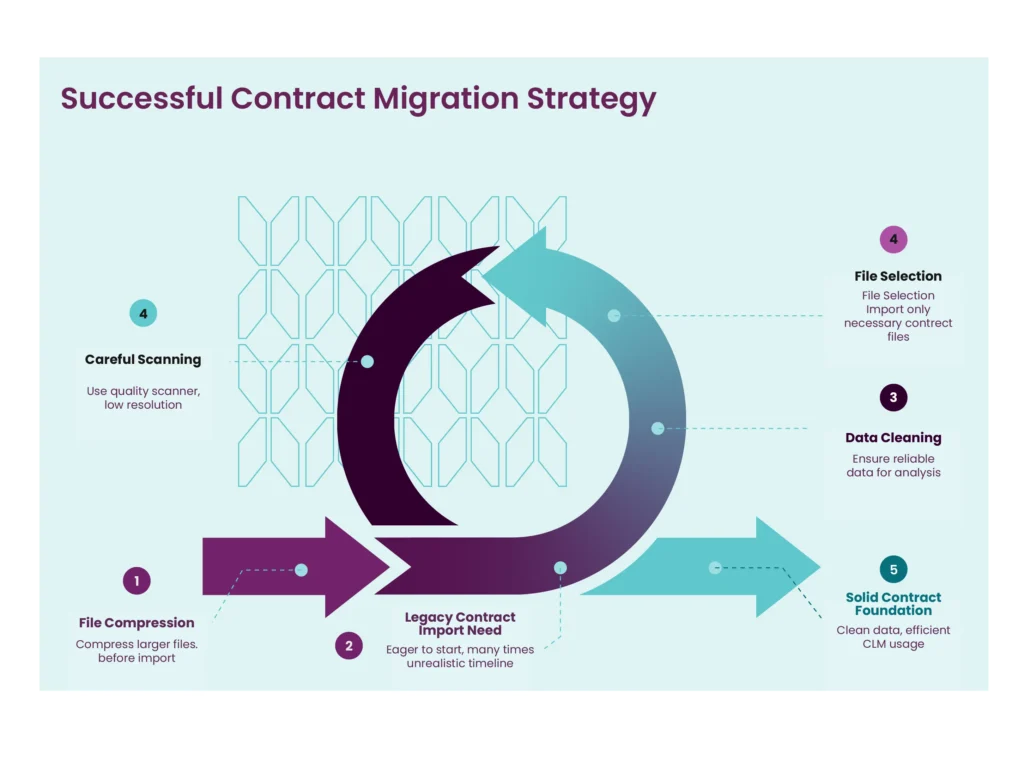
1. Be realistic – Contract Migration can be time-consuming
While this fact may be discouraging, the truth is that contract migration can be time-consuming. Too often I see people so eager to get started using their new CLM solution that they set unrealistic expectations for how long contract migration will take. Part of my job is to help them embrace the process and not fight it. Understanding up front that this can be a lengthy and tedious experience helps to manage their outlook. I like to remind clients that this process is like laying the foundation for a house. It may not seem terribly exciting, but it is worth putting in the time because it creates a solid basis for many things you do moving forward. Now is the time to evaluate what contracts you have, which ones you want to bring forward, and how clean the contract data is. This is also the time to establish appropriate resourcing for the project. You will need help, so be sure to ask for it!
2. Garbage in, garbage out
You’ve heard the saying “garbage in, garbage out”. This is so true with contracts! Now is your opportunity to make sure your contract data is cleaned up. This is so important because you want to consume that data for reporting and analysis, but if your data is unreliable, it provides no historic value. This is also the opportunity to determine which data you want to capture about a contract. The truth is you know your contracts best. Take time to consider the metadata fields that are most important for reference and reporting on your legacy contracts. Review that data to see how clean it is, and put in the effort to fix it so that moving forward you’re working with clean data.
3. Don’t be a pack rat – Choose only the necessary files for Contract Migration
How far back you go importing historic contracts will entirely depend on your corporate record retention policy. However, this is a great opportunity to ask yourself what is worth bringing forward? Not everything is valuable enough to import into the new system. When migrating other document types, including attachments, consider how necessary the files are for reference in your CLM solution. Too many files can not only exceed your contract storage limit but also clutter the contract record and search capabilities for your end-users. Use common sense and consult with contract owners when in doubt.
4. Scan with care
Part of the process of importing your contracts will probably involve scanning hard copies of paper documents if they exist. Be sure that you are using a good quality scanner at low or medium resolution for optimum file size. This will help you achieve high quality results that don’t exceed file size limits. Keep in mind, your optical character recognition (OCR) results will depend on the quality of the original documents themselves. Poor scans, creases, and handwritten values may not be read properly by OCR, impacting the final product.
5. The importance of importing
In general, be aware of any contract import limits and compress larger files where necessary. When scanning files, remember that OCR increases file size, so large files should be compressed prior to import. Also, files should not have other files embedded within the same PDF as this will impact the quality of the import.
What challenges have you faced during contract migration and what tips have you learned in the process?
Conclusion – Contract Migration
Contract migration is most effective when it is designed as a controlled contract data migration program, with explicit scope, standards, and quality assurance.
Key takeaways:
- Define scope early (what to migrate contracts vs. what to archive) using retention policy as the governing constraint.
- Inventory, ownership, and authoritative sources must be explicit.
- Prioritize data cleanup before migrating to CLM to prevent unreliable reporting and inconsistent metadata.
- Manage digitization constraints (scan quality, OCR limitations, file size) to reduce import defects.
- Operationalize importing contracts into a CLM system with phased waves, validation routines, and exception handling.
- Consider contract data migration services when scale or complexity exceeds internal capacity during CLM migration.
FAQs – Contract Migration
What is contract migration, and how does it differ from contract data migration?
In CLM, contract migration means the transfer of existing agreements into a centralized system, while contract data migration refers to the disciplined movement and normalization of contract metadata that supports reporting, governance, and lifecycle management. Most implementations treat these as coupled workstreams because the analytic value of a repository depends on the quality and completeness of the migrated data.
How to organize contracts before contract migration?
- Conduct contract discovery: identify where agreements reside (shared drives, legacy tools, physical files).
- Establish an inventory with unique identifiers, ownership, status (active/expired), and storage location.
- Define the migration scope (what to migrate now vs. later) and align stakeholders on the inclusion criteria.
- Standardize foldering and naming conventions only where it measurably improves downstream ingestion and QA.
How should organizations decide which historical contracts to migrate and which to archive?
Historical scope should be governed by retention requirements and practical utility. Migrating everything often reduces usability by increasing noise and storage burden; instead, organizations typically focus on agreements that remain active, enforceable, or analytically valuable for renewals, performance, or risk management.
How to clean up contract data before CLM migration?
- Apply the “garbage in, garbage out” principle: unreliable legacy data undermines reporting value.
- Normalize core fields (e.g., counterparty names, dates, renewal terms) and resolve duplicates/inconsistencies.
- Define which metadata fields are required for historical contracts versus future templates (“what you want to track”).
- Document data standards so future uploads do not reintroduce quality drift.
What are common pitfalls in contract migration?
- Exceeding contract import limits and failing to compress large files when needed.
- Importing PDFs that contain embedded files, which can degrade import quality.
- Assuming OCR is “free”: it may increase file size and still fail on poor scans.
- Skipping pre-import validation of naming, deduplication, and metadata mapping.
What are the benefits of AI for legacy contract migration and contract data extraction?
AI is most useful in legacy contract migration when it converts unstructured agreements into structured records by extracting metadata at volume and enabling baseline governance use cases (search, renewals, obligation visibility). Its limitations: extraction confidence depends on document quality and clause variability, which is why targeted human validation is required for high-risk fields.
How do you import thousands of existing contracts into a CLM system?
- Pilot a representative subset first to establish standards and quantify exception rates.
- Use bulk/mass upload capabilities rather than individual record creation.
- Separate workstreams: (1) document ingestion, (2) metadata tagging, (3) validation and exception handling.
- Where structured data exists (e.g., spreadsheets/CSVs), map fields to accelerate tagging.
- Use controlled vocabularies for parties and fields to reduce duplicates (e.g., “IBM” vs “International Business Machines”).
- Implement a QA protocol with risk-based sampling (higher scrutiny for high-value, regulated, or renewal-sensitive contracts).
How exactly can Malbek assist in the contract migration process?
Malbek assists with contract migration (and contract data migration) in a few concrete, implementation-grade ways—primarily by (1) reducing ingestion friction, (2) accelerating metadata extraction for legacy contracts, and (3) making the migrated corpus operational through governance, workflows, and integrations.
1) Establish a controlled migration scope (MVP-first)
Malbek’s guidance treats legacy contract migration as a parallel workstream to CLM implementation and recommends starting with an MVP (i.e., migrate the contracts that matter operationally first, then expand).
2) Bulk intake from enterprise repositories (document-first migration)
For the “bring the files in” phase of the importing contracts into CLM system process, Malbek provides native storage integrations that support bulk document import (useful when contracts already live in shared repositories):
- SharePoint: bulk import large volumes of legacy contracts (with metadata/folder structure considerations) and support bi-directional document flow.
- Box: drag-and-drop imports and support for bulk legacy imports, with optional export/archival flows.
- Google Drive / Dropbox: drag-and-drop import designed for legacy contract import support.
- SFTP: automated bulk import/export workflows intended for enterprise-scale operations and scheduled/on-demand sync.
Practically, AWS S3 and these connectors help organizations organize contracts by pulling them from where they already reside, rather than forcing premature re-platforming of storage.
3) Enforce import hygiene (reduce preventable ingestion defects)
There are a few operational constraints that commonly break migrations—such as import limits, OCR-driven file size inflation, and embedded files inside PDFs that reduce import quality.
This is where data cleanup before migrating to CLM is not abstract advice; it becomes a set of pre-ingestion controls that materially reduces rework.
4) Accelerate contract data extraction for legacy contracts
Malbek supports document migration + data enrichment via extraction-oriented capabilities:
- Brightleaf AI integration: positioned specifically to digitize and extract structured data from thousands of legacy contracts, pairing AI extraction with validation.
- Malbek’s broader extraction framing emphasizes capturing renewal dates, indemnity terms, governing law/jurisdiction, payment terms, termination clauses, and SLAs—i.e., the core fields that make migrated contracts governable and reportable.
- Product release notes also reference bulk extraction of key terms/clauses and “import + analyze + clause playbook” workflows oriented to legacy contract import contexts.
This is the main lever by which Malbek helps convert legacy contract migration from “documents in a repository” into contract data migration that supports reporting, renewals, and post-award visibility.
5) AI-native workflows to reduce manual overhead (where appropriate)
Malbek AI is natively embedded (not bolt-on), supporting tasks such as data extraction and contract interaction through conversational interfaces (“Bek”).
In migration terms, this is most relevant after ingestion—when teams need to triage, interpret, and operationalize migrated agreements at scale.
6) Integrate and scale via APIs and bulk operations
If your migration strategy relies on upstream systems (data warehouses, ETL, custom ingestion pipelines, or internal portals), Malbek exposes API capabilities that include bulk-oriented endpoints for contract data/status retrieval and programmatic updates.